
eScripts were designed to make life easier — no more lost paper prescriptions, no more frantic searches through drawers and handbags. And for the most part, they do.
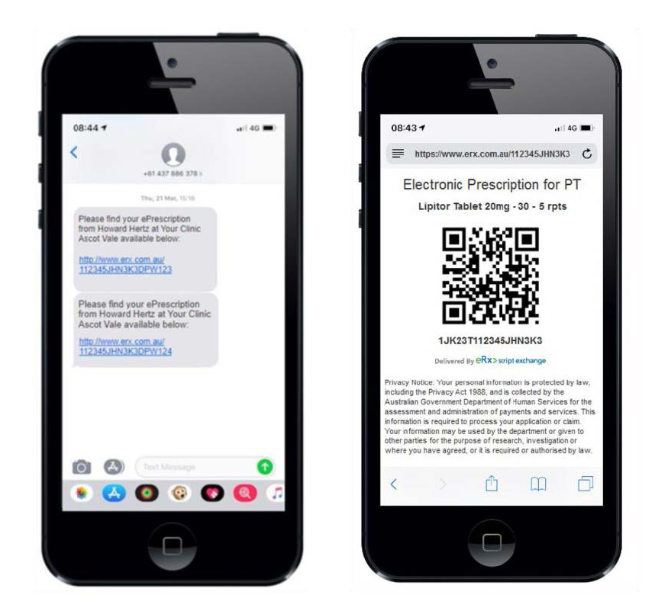
But lately, many parents have been calling in confused (and understandably frustrated) because their child’s eScript is showing “no more repeats” — even when they’re sure repeats were originally included. In other cases, the QR code or barcode simply disappears, leaving families stuck without medication when they need it most.
Here’s what’s usually going on behind the scenes — and what you can do to fix it quickly.
1. Each repeat generates a new token
With eScripts, every time a prescription is dispensed, a brand-new QR code (also called a token) is created for the next repeat. Once the original token has been used, it becomes invalid — even if repeats are still available. If a parent tries to reuse the old token, the system will often display “no more repeats,” which is confusing but technically correct for that specific QR code.
After the first fill, the pharmacy should automatically send a new eScript token via SMS or email for the next repeat. If that message doesn’t arrive — or gets lost among a hundred other notifications — you won’t be able to fill the repeat elsewhere, even though repeats still exist.
What to do:
Call the pharmacy that last dispensed the medication and ask them to reissue the repeat token.
2. Pharmacy or system sync errors
Sometimes the issue isn’t the token at all. The Prescription Delivery Service (PDS) or the pharmacy’s dispensing software can experience glitches or syncing errors, which make it look like there are no repeats left when there actually are. This is surprisingly common — and thankfully, usually easy to fix.
What to do:
Contact the pharmacy and specifically ask them to:
- Check the Prescription Delivery Service (PDS)
- Reissue the eScript token if repeats remain
A quick reset or re-sync on their end often solves the problem.
3. Expiry dates still apply
Even if repeats remain on a prescription, they can’t be used after the legal expiry date. In Australia, this is usually:
- 6 or 12 months from the issue date (depending on the medication type)
- Shorter for certain controlled or restricted medicines
Once a script expires, any remaining repeats are automatically cancelled by the system.
What to do:
Try to fill repeats before the expiry date wherever possible.
If the script has expired, contact your doctor’s rooms to request a new prescription. For long-term medications, it’s best to allow plenty of time — ideally two to four weeks before the last tablet is due to be taken — especially if you don’t already have a booked consultation.
Handy tips to avoid repeat eScript headaches
- Always check your SMS messages and email for a new eScript token after each fill
- Keep track of which pharmacy last dispensed the medication (their name is usually on the bottle or box)
- Set a reminder to check script expiry dates before you run out
- If you need a new script without a consultation, contact the doctor’s rooms well in advance
In short:
Most “no more repeats” messages are fixable. A quick call to the pharmacy is usually all it takes to get your child’s medication back on track — without extra appointments, panic, or last-minute stress.